Noncovalent Interaction Plot
NCIplot
Generate reduced-density-gradient and signed-density data from wavefunction or promolecular densities with a program dedicated to NCI analysis.
- Role
- Dedicated real-space NCI analysis
- Typical input
- wfn/wfx or XYZ and NCI input
- Typical output
- Density/RDG cubes, data, VMD script
1. Density models
Wavefunction-derived density uses wfn/wfx data, whereas promolecular density sums independent atomic densities from an XYZ geometry. The latter is fast but does not include molecular density relaxation.
Promolecular density is inexpensive but omits density relaxation and polarization. State explicitly whether the plot uses a wavefunction or an XYZ-based promolecular density.
2. Installation and execution environment
Compile or install NCIplot according to the official repository, then record the program revision, compiler, and density-library setup. Test the installation with a distributed example before analyzing research data.
3. Input and execution
An NCI input specifies the molecule, density source, grid, and cutoffs. In the locally tested 4.2.1 alpha build, CUTPLOT takes the density cutoff and RDG isovalue as two values. Check the syntax of the installed version.
nciplot water-dimer.nci water-dimer.out1
water-dimer.xyz
OUTPUT 2
CUTOFFS 0.2 2.0
CUTPLOT 0.05 0.5
ISORDG 0.5Run with nciplot example.nci example.out. Input keywords vary across releases, so retain the exact input and version.
4. Grid and cutoffs
The grid must contain the interaction region with adequate spacing. Density and RDG cutoffs control which points and surfaces are retained; changing them changes the visual result.
Use the same grid extent, spacing, density cutoff, RDG cutoff, and plotting range for a comparative series. A visually larger surface may otherwise be a parameter artifact.
5. Output files
Typical outputs include density and RDG cube files, scatter-plot data, and a VMD script. Associate each file with the generating input to avoid mixing grids or color fields.
| Output | Use |
|---|---|
| RDG cube | Defines the isosurface geometry |
| signed-density cube | Colors the surface |
| scatter data | Plots RDG against signed density |
| VMD script | Reproduces visualization settings |
6. VMD visualization
Use the RDG cube for surface geometry and signed density for coloring. Fix isovalue and color range when comparing a molecular series.
vmd -e example.vmdInspect the generated VMD script before use and retain it with the cube files. It records which volumetric dataset defines the surface and which field defines its color.
7. Relationship to Multiwfn
NCIplot is a focused command-line implementation for NCI grids and plots. Multiwfn provides broader wavefunction analysis and additional IGM-family functions. The two can produce conceptually related outputs, but defaults, grids, and density sources must be matched before numerical or visual comparison.
8. Interpretation
NCI surfaces identify regions compatible with weak interactions, steric contacts, or density overlap. They do not uniquely assign an interaction type or quantify its energy.
Reproducible Example
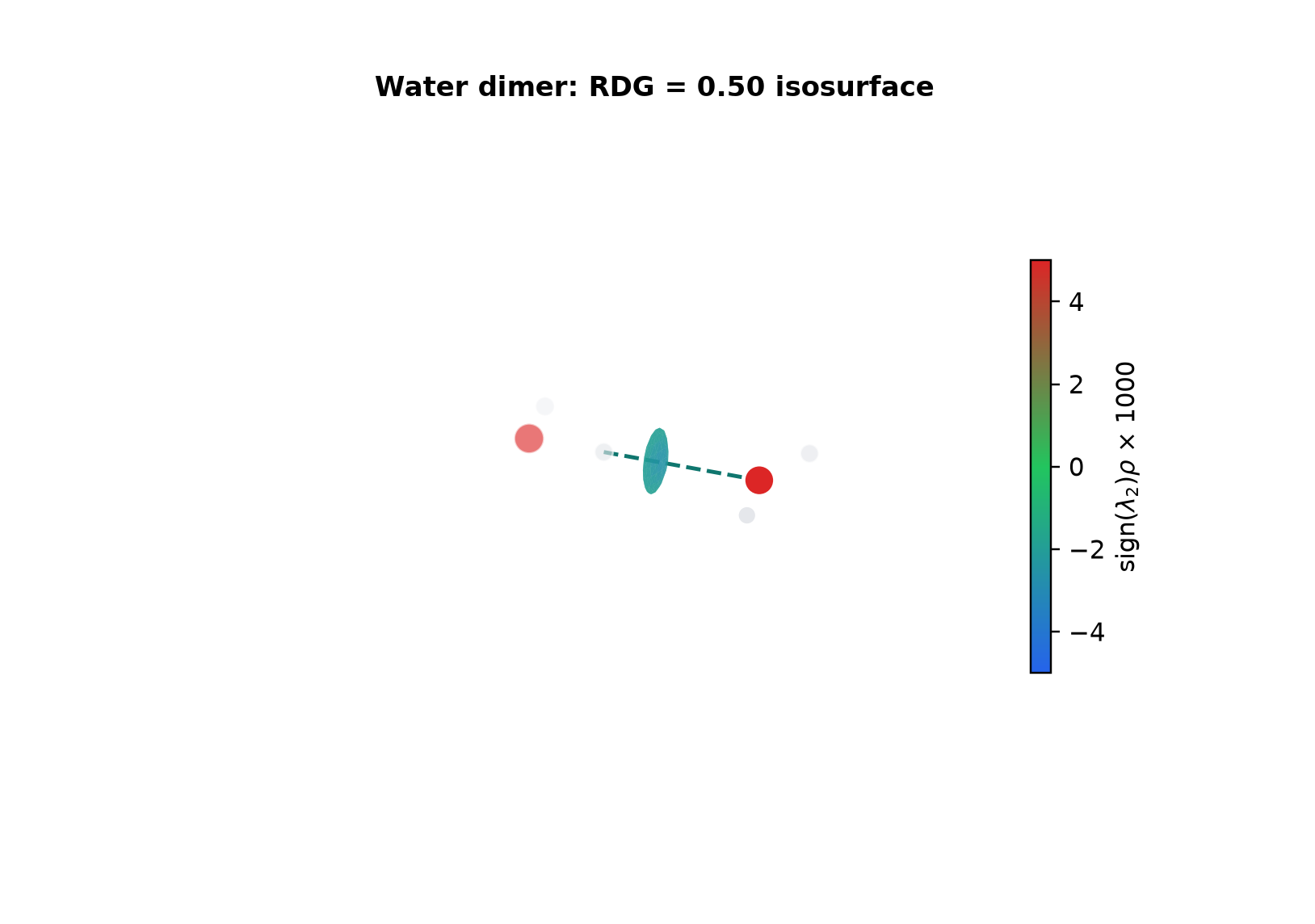
9. Calculated example: water-dimer NCI
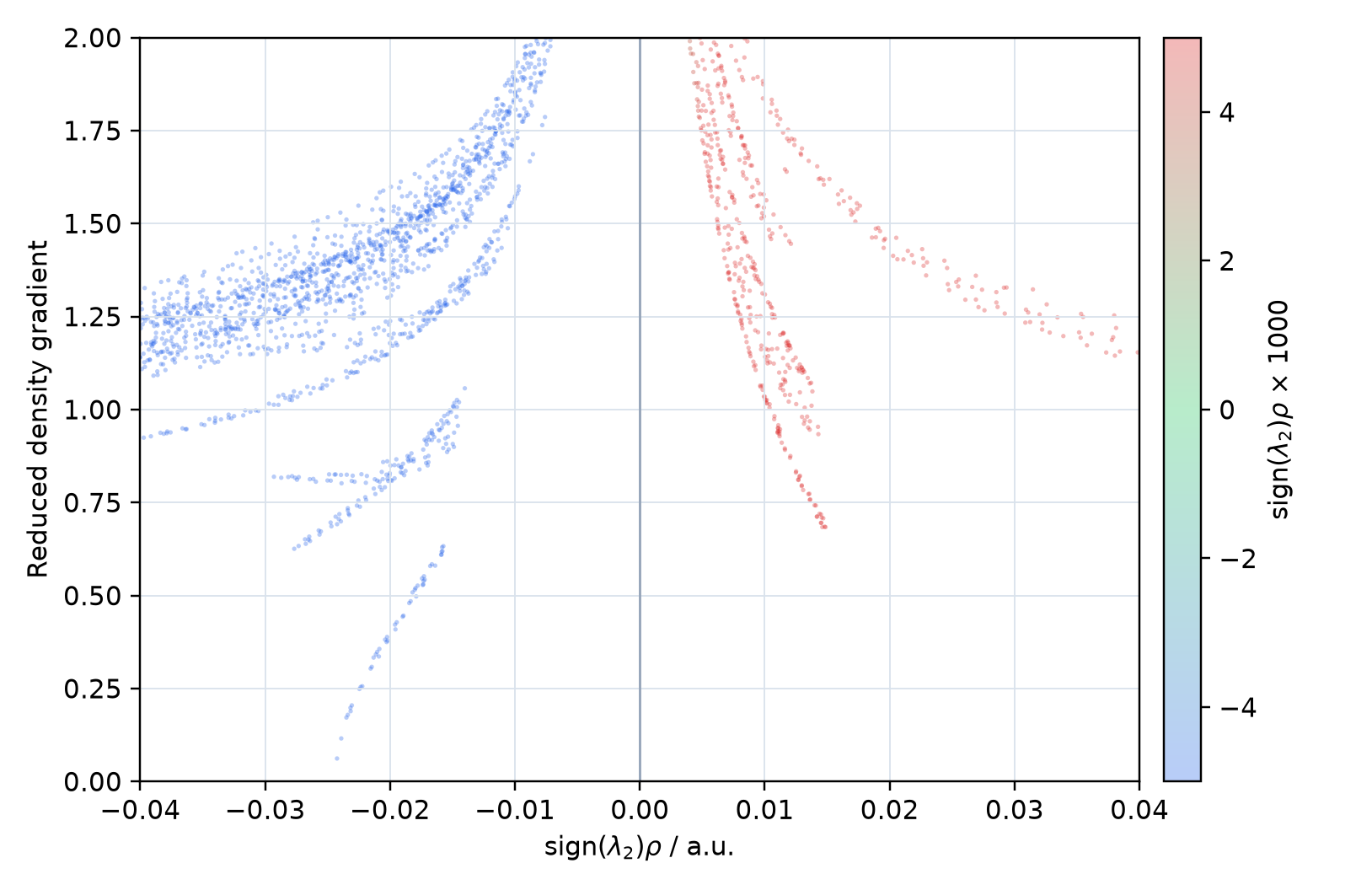
A fixed water-dimer geometry was calculated at RHF/def2-SVP and analyzed with NCIplot 4.2.1 alpha using wavefunction-derived density.
Loading NCI cube data...
The RDG cube defines shape and the signed-density cube defines color. The color range is fixed at −5 to +5. 3Dmol.js 2.5.5
How to read the NCI plots
- Low-RDG points at negative sign(λ2)ρ are attractive-like; here they correspond to the blue-shifted surface and negative-side spike along O-H···O.
- Green near zero is commonly weak-contact or dispersion-like; positive red regions are repulsive/steric-like density overlap.
- The colors are qualitative interaction indicators; surface area, color, or spike position does not directly yield a hydrogen-bond energy.
- Density model, grid, cutoffs, and isovalue affect the plot and must be held fixed in comparisons.
10. References
Last reviewed: August 4, 2026. Check the linked official documentation for syntax specific to the installed software version.